Customers and devices
Finding, filtering, exporting, and onboarding customers and viewing POS devices
The customer page
The customer page is the one place to look when a customer phones, when you are deciding whether to renew, or when you need to see how a customer's stores have been trading.
A customer is an end-customer organisation, grouped by its TPIN. A customer can have one or more stores, and a store is one device.
What the customer page shows
The page is built around four things:
1. Who the customer is. The customer's name, TPIN and store references.
Not yet confirmed. The exact field list for customer identity is being finalised. It is drawn from today's customer records, and the list you see at publication may be shorter.
2. The two statuses, side by side. Every store on the page shows a trading status and a subscription status, and they are shown as two separate things:
| Indicator | What it tells you |
|---|---|
| Active or Inactive | Whether the store has had a completed sale in the last 30 days |
| Active subscription or Unsubscribed | Whether the store's subscription has expired |
Archived is its own state and is not a trading status.
What the 30 days are counted back from. This page has no date picker, so the trading status is measured back from the day you are reading the page — today's date, in Zambia time for Zambian accounts. A store is Active when it has at least one completed sale in the 30 whole calendar dates ending on that day, and Inactive when it has none. It is the same 30-day rule the activity report uses, with today standing in for the report date. Because today is included in the window, a sale made earlier today falls inside it. The status is the platform's reading for that day, and when in the day that reading is taken is not confirmed yet, so do not treat it as live. The date the status was measured to is meant to be shown beside it, so you can see what "Active" was measured against — that display is not confirmed yet.
If a store's sales cannot be read for that day, the trading status is not shown as Inactive: "no sale in the window" and "not checked" are different answers, and the page gives the second one rather than guessing.
Not yet confirmed. The agreed 30-day rule is written against a report date you choose, and this page has no report date of its own. Measuring the window back from the day you read the page is how the platform is being built for this page, and that reading is still to be confirmed. Showing the measurement date beside the status is intended, not confirmed: that display is still being decided, so do not rely on seeing it on screen today. The timing is unconfirmed in the same way: it is not yet settled when in the day the sales figures are read, so the status is the reading for that day and the exact moment it represents is still open. When it is confirmed, this note is removed.
Not yet confirmed. The approved design of this page still shows one column headed "Paid current". Showing both indicators on every store row is the agreed requirement, and the page is being redesigned. Until it is, do not expect the approved design to match this description.
What the statuses mean explains both, with worked dates.
3. Devices, counted three ways. The page keeps three different things apart, because they are not the same:
- Registered — the device has appeared after the customer signed up at the POS.
- Licensed — Synergy holds a licence for it.
- Actively transacting — it has had a completed sale in the last 30 days.
Not yet confirmed. The counts and how a licence maps to a particular device are being confirmed. Until then, treat the three counts as three separate questions, not as one number.
4. History. The original sign-up date, the last active date and time for each store, and the customer's charges and licence counts over time.
The original sign-up date is kept separate from the Smart Invoice onboarding and activation dates, because they are different dates that answer different questions.
Not yet confirmed. How far back the history goes, whether every field is populated for older customers, and whether the page shows invoice amounts and payment types are being confirmed. A Smart Invoice activation date does not exist in today's records and is being confirmed as a proposal.
What the page will never show
The platform is not a view of your customers' sales. It will never show:
- sales invoices, invoice lines or individual sale amounts;
- private transaction details; or
- what Chrilan charges your franchise.
Activity is shown as a yes/no and as a last active date and time, not as a list of sales. This is deliberate: showing trading activity does not require exposing a customer's sales.
Two things that look similar and are not
- A store with no recent sales is not the same as a store whose subscription has lapsed. The two statuses move independently; see What the statuses mean.
- A device being registered does not mean it is licensed, and being licensed does not mean it is trading. They are three separate facts about the same store.
Not yet confirmed. What the page shows for a customer that has no subscription record at all — neither active nor expired — is still being decided. It is a known gap and will be written up here before publication.
Next: What the statuses mean.
Searching, filtering, exporting, and onboarding a customer
From Customers & devices in the sidebar you can:
- Search by customer name, TPIN, phone number, account number, or device serial.
- Filter with the pill chips: All customers, Active customers, Archived, All devices, Active devices, and Inactive devices.
- Export the full matching list to Excel (
.xlsx) or CSV. - Add a new customer using the Add customer button (enter customer name, unique account number, TPIN, and phone). Duplicate account numbers are refused safely without overwriting an existing customer.
- Open a customer record to inspect their stores and POS-registered devices.
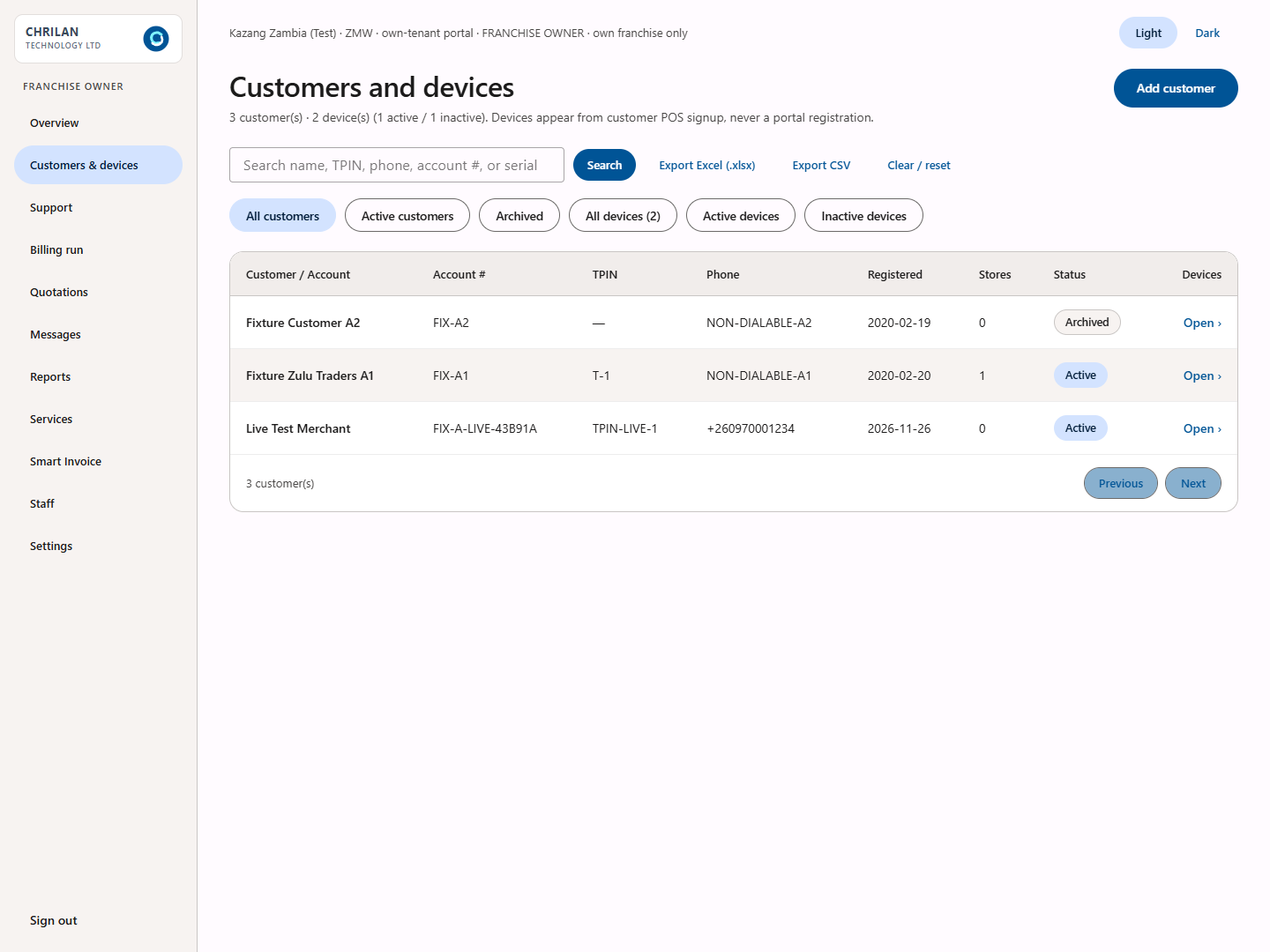
The Customers and devices screen in V2. Example synthetic data only.